 Screen2Form
Download
Screen2Form
Download
Copy a whole window.
Fill a whole form.
One click each.
Screen2Form captures everything on screen and splits it into names, phone numbers, emails, dates, addresses and more. It then pastes each value into the right field in the right format, across many pages and apps. It works with local formats worldwide.
Free trial · Windows 10 & 11 · No account needed
See it in action
Three source pages are captured and two form pages are filled, in under a minute.
How it works
Capture any window
One click captures a window from corner to corner. Text is split automatically into names, phone numbers, emails, dates, addresses and more. Repeat across as many pages and apps as you like, and everything joins one list.
Review
See what was found, remove anything you don't need and check every match before anything is typed.
Fill any form
Screen2Form detects each field and the format it expects, then converts each value to fit. It works across forms with multiple pages.
For example, in your region: Date · dd/mm/yyyy Phone · +1 …
Everything you need to move data
Multi Copy stack
Collect up to 50 captures or copies. A badge on the floating button shows the count.
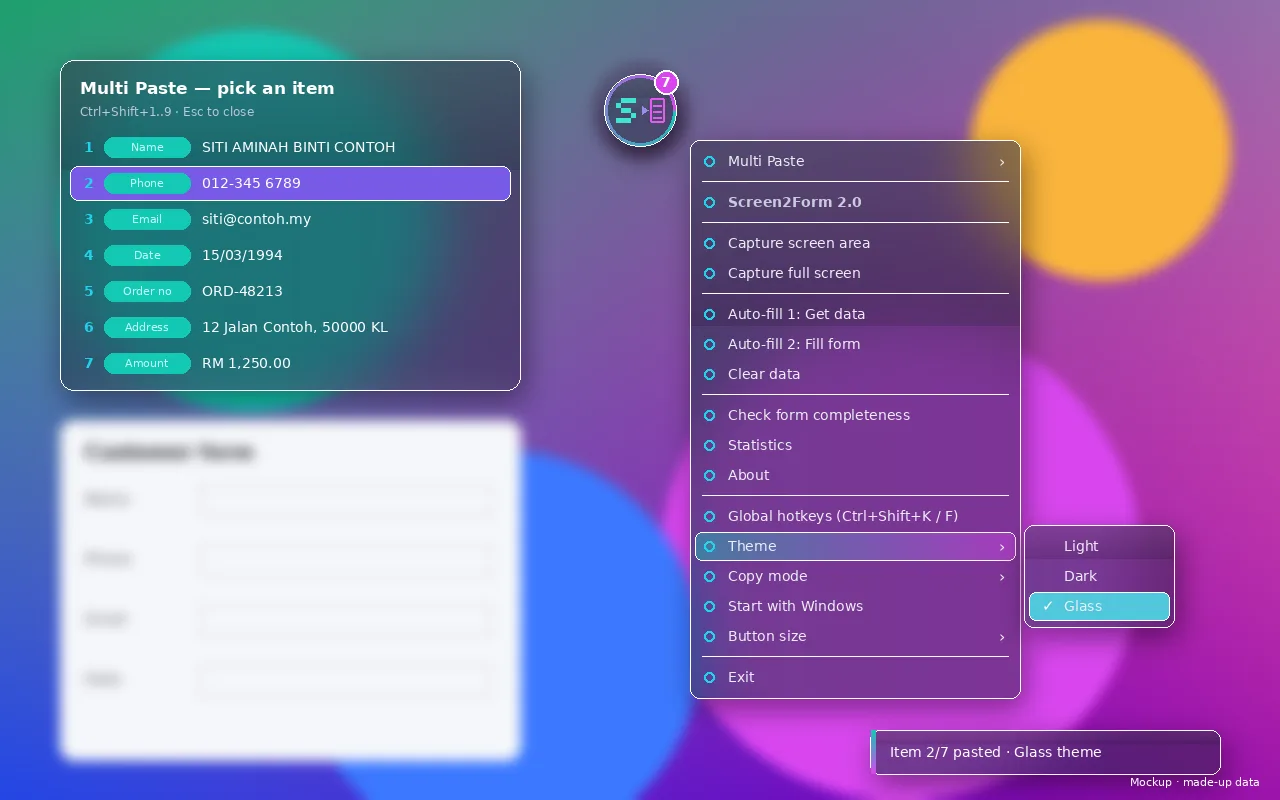
Multi Paste
Paste in sequence, pick from a list, or jump straight to an item with Ctrl+Shift+1..9.
Smart Fill
Matches items to fields and converts formats automatically, for example 03/15/1994 or +1.
Works in any app
Browsers, desktop apps, PDFs, spreadsheets and images. If it's on screen, it can be copied.
Glass, Light & Dark
A floating glass button and frosted menus that fit right into Windows 11.
Portable single exe
No installer and no runtime to set up. Just run it, even from a USB stick.
Private by design
Your screen is your business. Screen2Form is built to stay out of the way.
- Images and data stay in memory or the clipboard only. Nothing is saved to disk.
- You review every match before anything is filled.
- It never presses Enter and never submits forms, so you stay in control.
- Press Esc at any time to stop.
- It works offline. OCR runs locally with built-in Windows OCR.
What people could say
These are placeholder examples, not real reviews. Real feedback will replace them after testing.
“I copy details from scanned documents into our system all day. Now it takes a couple of clicks.”
“Dates and phone numbers come out in the right format for each form. No more retyping.”
“I like that nothing is uploaded and it never submits anything for me.”
Download Screen2Form v2.1.0
New in 2.1.0: Learned forms, confidence colours, sharper OCR, global formats, undo last fill.
Files (download all five)
- Screen2Form.zip.001 23 MB
- Screen2Form.zip.002 23 MB
- Screen2Form.zip.003 23 MB
- Screen2Form.zip.004 3.4 MB
- JOIN.bat
How to install on Windows
- Put all five files in one folder.
- Double-click JOIN.bat. It creates Screen2Form.zip.
- Unzip Screen2Form.zip.
- Run Screen2Form.exe.
The app is not code-signed yet, so Windows SmartScreen may warn you. Click More info, then Run anyway.
Free trial · No account needed · Windows 10 & 11
Simple pricing Draft
Prices shown in your local currency; final price at checkout.
FAQ
Which Windows versions are supported?
Windows 10 and Windows 11 (64-bit). The glass effect uses acrylic on Windows 11 and blur on Windows 10.
Does it need the internet?
No. OCR and matching run entirely on your PC with built-in Windows OCR.
Does it handle my country's formats?
Yes. It reads what each field expects, such as date order, phone prefixes, uppercase or digits only, and converts values to match. It works with local formats worldwide.
Why does Windows show a SmartScreen warning?
The app is not code-signed yet. Click "More info" and then "Run anyway". A signed release is planned.
Is my data safe?
Captures stay in memory or the clipboard and are never written to disk. Only a small settings file is stored, and nothing is uploaded.
Is there a Mac or Android version?
Both are planned. Windows comes first, then Mac, then Android.
Tell us what you need
Send us feature ideas, bugs or the forms you fill every day.